Workflows
AI PowerPoint generator that drafts before the file
Gamma is an AI PowerPoint generator for teams that need structured slides fast—and a PPTX when the process demands a file. Build the argument outline-first, present from a link when you can, export to PowerPoint when you must. Channel choice is a planning decision, not an afterthought.
Who this AI PowerPoint generator is for
Use Gamma when your stakeholders still say send me the PowerPoint, but you refuse to start from a blank .pptx. Typical jobs include client leave-behinds, enablement packs, board packets that must travel by email, and sales decks that will be marked up offline. You want AI for structure and speed, then a clean handoff into the PowerPoint-centric world without rebuilding the story from scratch.
- Consultants who draft in a modern editor but deliver PPTX to clients.
- Enablement teams that need training decks others will edit in PowerPoint.
- Founders whose investors or lawyers still require a file attachment.
- Internal operators escaping blank-canvas PowerPoint for weekly packs.
Not for you if…
Stay in native PowerPoint if your company mandates locked masters, approved icon libraries, and compliance review that rejects any non-standard file provenance. Skip AI generation if the deck is mostly linked Excel objects and macros. And if you only need a present link for an internal room you control, you may not need PPTX at all—do not force an export workflow for a job that does not require a file.
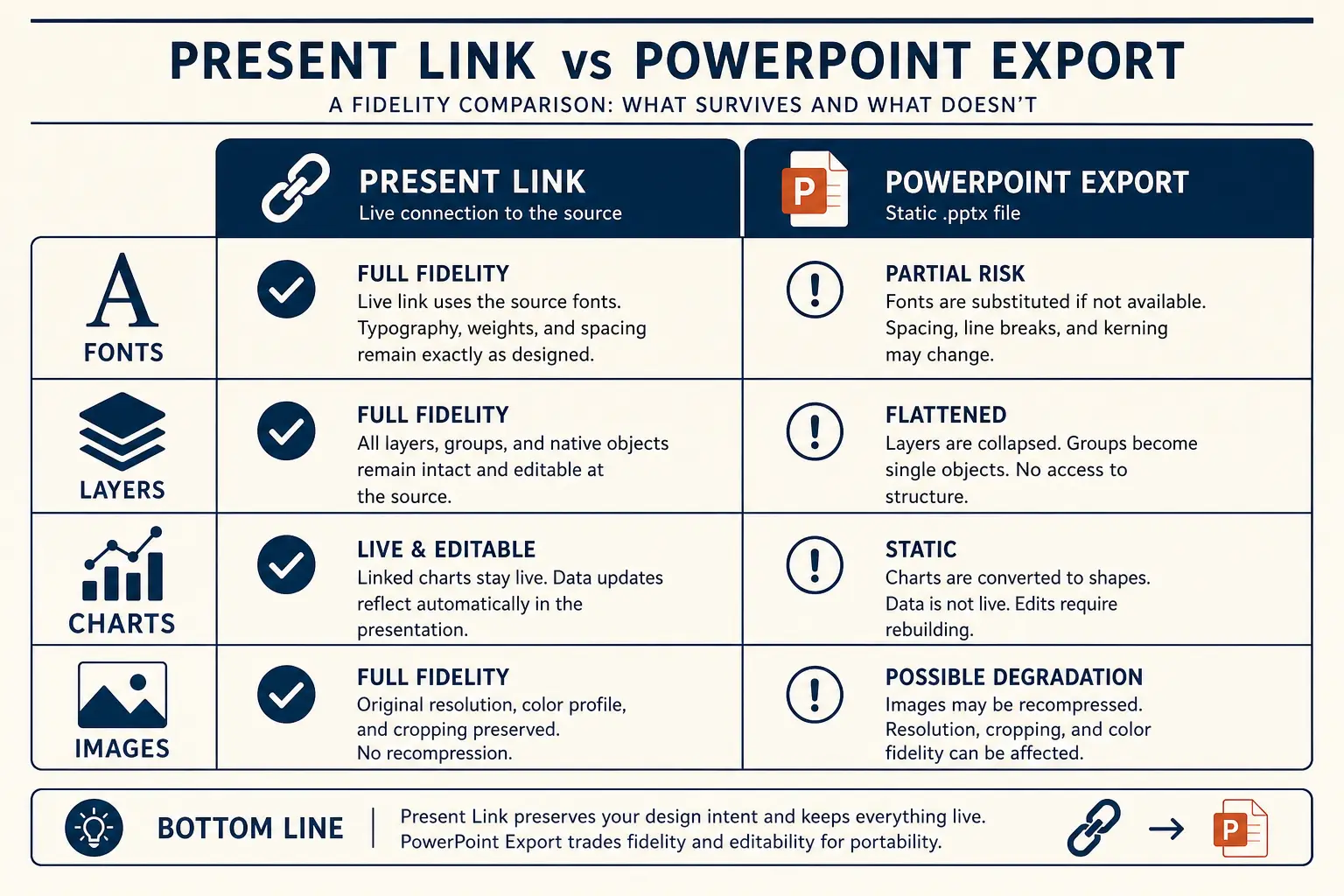
Present link vs PPTX fidelity
Present link
- • Live latest edits
- • Best for your room
- • Analytics-friendly
Export PPTX / PDF
- • Offline / procurement
- • Brand review in PPT
- • Expect cleanup passes
The FILE decision framework
Before you generate, run FILE: Format required by the room, Interaction model (live vs leave-behind), Layout density target, and Export early test. Teams that skip FILE discover broken overlays the night before the meeting. An AI PowerPoint generator is only as good as your channel plan. If the answer to Format is present link, optimize for sparer slides. If the answer is PPTX leave-behind, write denser proof and fewer verbal punchlines.
- Format, link, PDF, or PPTX. Write it in the brief so the outline densifies correctly.
- Interaction, will you speak every slide or will the file travel alone?
- Layout, prefer simple stacks if export is mandatory; save delicate overlays for link-only decks.
- Export early, generate five slides, export once, adjust habits before slide thirty.
How the Gamma → PPTX path works
- Brief with FILE answers and real proof inputs.
- Outline gate—kill tourism sections before layouts exist.
- Edit slides for claim titles and proof objects.
- Present from link when possible; export PPTX on Pro when required. Details live on export to PPTX.
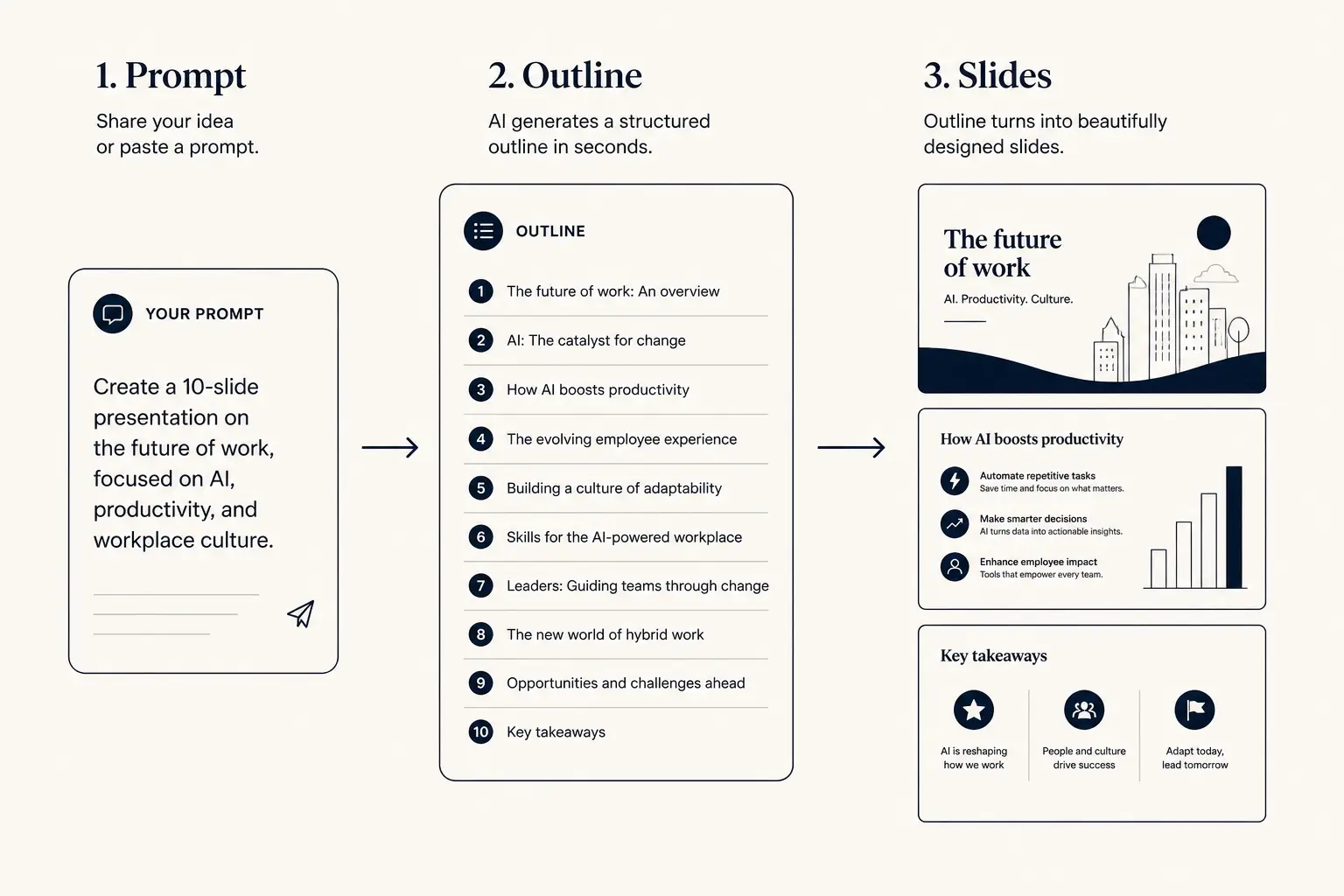
Prompt → outline → slides
1. Prompt
Audience, goal, length, proof you already have.
2. Outline
- • Opening claim
- • Proof beats
- • Ask / next step
3. Slides
Outline preview
- Narrative, open with Create a 14-slide leave-behind for a
- Body, 3–5 slides that carry the argument
- Close, summary, risks, and the ask
Preview only, Gamma expands this into editable slides.
Budget slides for the channel
Leave-behinds often need more slides than a live talk because the file must stand alone. Live talks need fewer. Set minutes and stakes, then adjust upward if the deliverable is a forwardable PPTX with no speaker.
Slide budget calculator
Get a realistic slide count from meeting length and stakes, then open a matching prompt in Gamma.
18
Total slides
13
Core narrative
5
Appendix
Create a 18-slide deck for executives who skim. Meeting length: 20 minutes. Stakes: medium. Use an outline-first structure with 13 core narrative slides and 5 appendix slides. Every slide needs one claim and proof.
Open this budget in GammaWorked example: CFO leave-behind in fourteen slides
Scenario: after a discovery call, you must send a deck the CFO can forward to procurement. You will not be in the room when they read it. Numbers you have: current process costs roughly $18k per month in manual ops time across four analysts, pilot showed 35 percent time reduction, implementation is six weeks, and risk is integration with their ERP. Bad prompt: make a PowerPoint about our product. Good prompt names the CFO, the forwardable leave-behind constraint, ROI assumptions, and the ask for a scoped pilot.
Live-if-present path would be ten slides. Leave-behind path is fourteen: problem cost, status quo failure modes, proposed workflow, ROI table with assumptions visible, implementation plan, security one-pager, case proof, risk register, pricing options, next steps with owner and date, plus appendix FAQ. Export once after slide five to confirm tables survive. Keep charts simple. Put the assumption footnotes on the ROI slide, not in speaker notes the CFO will never see.
| Slide | Must work without a speaker | Export note |
|---|---|---|
| ROI | Show $18k monthly cost, 35 percent reduction, and math assumptions | Prefer a simple table over overlapping callouts |
| Security | Answer the three objections procurement always forwards | One column of claims with links to trust docs |
| Next step | Named pilot scope, owner, and decision date | No decorative thanks slide—end on the ask |
Slide density spectrum
Sparse
Live stage
1 claim, huge type
Balanced
Default
Claim + 3 proofs
Dense
Leave-behind
Detail for async read
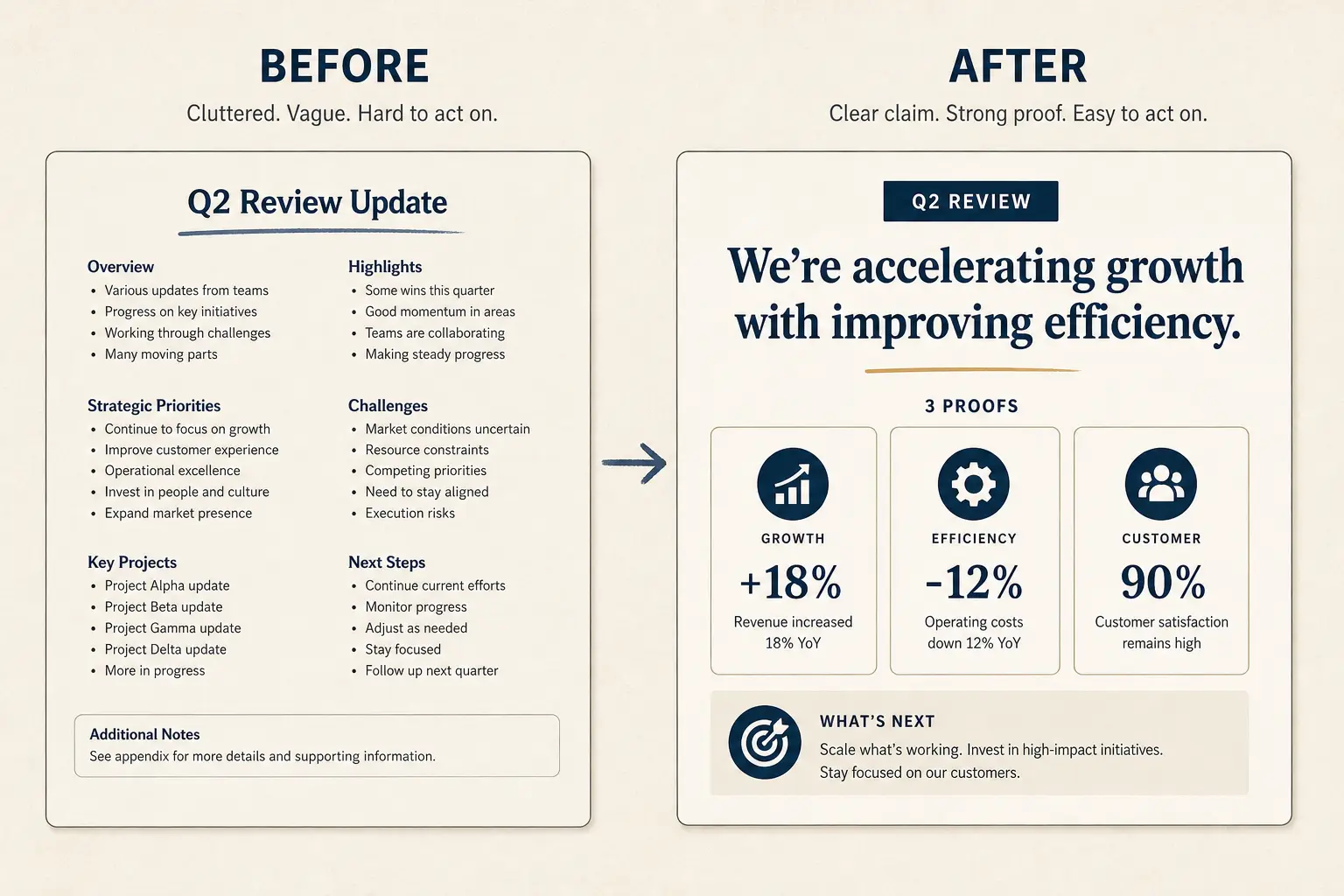
Rewrite before you export
If the draft still has Overview and Features titles, fix the claims before you touch PPTX. Exporting soup just makes soup portable.
Weak bullets → claim/proof/ask
Paste a bad slide. Get a rewrite pattern you can drop into Gamma, not vibes, a structure.
- Claim: Overview (make the cost of inaction obvious)
- Proof: Our platform (add a number, name, or constraint)
- Proof: Features (add a number, name, or constraint)
- Proof: Benefits (add a number, name, or constraint)
- Ask: Thank you (one decision, one owner, one date)
Mini comparison: drafting homes for PPTX jobs
Honest splits matter. See Gamma vs PowerPoint and Gamma vs Copilot. Score tools with Method.
| Job | Start in Gamma | Stay in PowerPoint |
|---|---|---|
| Blank-canvas narrative | Outline-first AI draft, then export if needed | Slow unless Copilot plus a strong human outline |
| Locked corporate master | Only for narrative drafts outside governance | Required for compliance packaging |
| Live internal review | Present link often enough—skip PPTX | When attendees only open .pptx |
Present versus export in practice
Present from Gamma for rooms you control. Export PPTX when procurement, offline venues, or stakeholder markup require a file. Pro unlocks PDF, PPTX, and PNG—see Plans. For the fidelity checklist, use export to PPTX. For general AI deck craft, see the AI presentation maker.
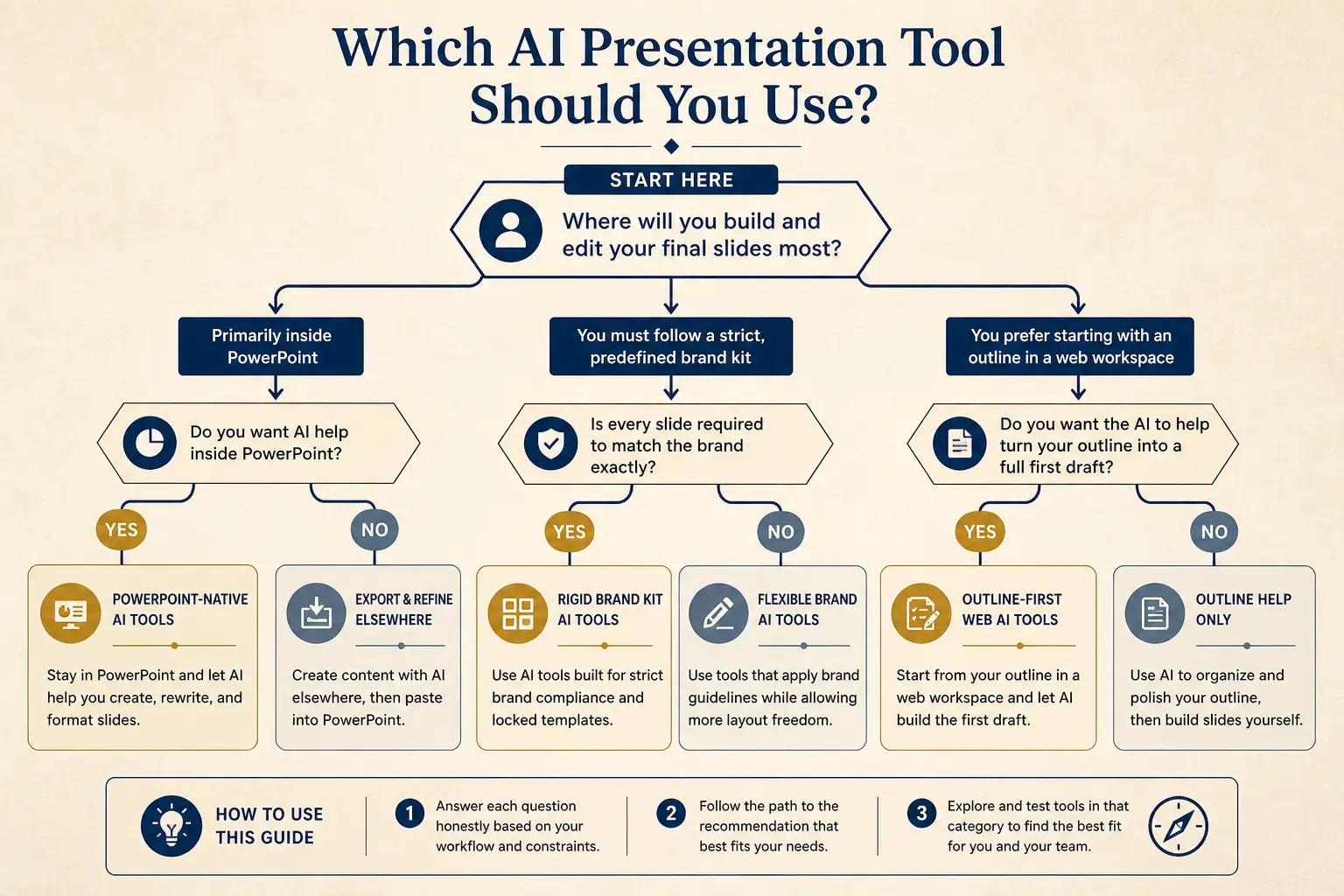
Which tool for which job
Need native PowerPoint editing every day?
Yes → Plus AI / Copilot · No → continue
Need rigid brand kits across a large team?
Yes → Beautiful.ai / enterprise kits · No → continue
Need outline-first AI drafting + present link?
Yes → Gamma
Export hygiene checklist
Treat export as a product requirement, not a download button. After the outline is approved, generate a five-slide sample path that includes one table, one chart, and one dense text slide. Export that sample to PPTX immediately. If tables wrap badly or overlays collide, simplify the layout system before you build the remaining slides. Teams that wait until slide thirty discover they must redesign under deadline pressure.
- Prefer single-column claim slides when the file will be printed or viewed on a laptop without presenter mode.
- Keep footnotes on the slide when the reader will not hear speaker notes.
- Avoid tiny multi-series charts that become unreadable after export scaling.
- Name the file with date and version so email threads do not fork the wrong ask.
- Re-export after final number changes; never patch critical figures only in an old attachment.
Anatomy of a claim slide
Claim headline (one idea)
Supporting line that states the so-what for this audience.
Source / footnote
ROI slides that survive forwarding
Forwarded PowerPoint files are hostile environments. Readers skip to the money slide, screenshot one table, and ask finance to poke holes. Build ROI slides with visible assumptions, time windows, and sensitivity notes. If AI drafts a tidy savings number without showing inputs, rewrite it before export. A CFO will trust a slightly uglier table with clear math over a beautiful callout that cannot be audited. Put the next step on the following slide so the forward chain includes an action, not only a number.
When Copilot is enough and when it is not
If you already have a strong corporate master and a clear outline in your head, PowerPoint Copilot can accelerate formatting inside the file you must deliver. If you do not have an outline, Copilot often decorates confusion. Gamma is the better starting home when the bottleneck is argument structure. Many teams draft in Gamma, export once, then do final brand alignment in PowerPoint. That hybrid is honest. Pretending one tool owns every constraint is not.
For training packs that many people will edit, exported PPTX can be the right end state even if you drafted elsewhere. For weekly internal reviews you control, a present link usually beats attachment churn. Put the decision in the brief so AI densifies for the real channel.
Treat Copilot as a layout finisher, not a narrative owner. Lock slide order, claim titles, and proof labels in Gamma first. Only then open the exported file for master slides, corporate fonts, and reviewer comments. Teams that reverse that order spend the night fixing pretty slides that still cannot answer the ask.
Failure modes that break PPTX handoffs
- Designing for cinematic present mode, then expecting identical PPTX.
- Leaving speaker-only jokes as the only explanation on leave-behind slides.
- First export on the night before the deadline with thirty fragile overlays.
- Using AI to invent ROI numbers the CFO will reverse-engineer.
- Shipping Overview titles into a file that must stand alone.
- Forcing PPTX when a present link would have been clearer and newer.
- Patching numbers in email while the source deck stays stale.
- Ignoring FILE until after design polish locks bad density choices.
Workflow depth lives under presentation workflows in Learn. If your source is a document, start at document to presentation. If you need a general AI presentation maker overview, read that money page next. Prefer a reusable spine before export? Start from the templates library , pitch, sales, and product-review outlines that survive a PPTX handoff better than a blank file. Plans cover when PPTX export unlocks on Pro so you are not surprised the night before a procurement deadline.
Frequently asked questions
Draft the story, then export the file
Open Gamma with your FILE answers. Edit the outline, test one export early, and stop starting from a blank PowerPoint.