Product
AI presentation maker that starts with the story
Gamma is an AI presentation maker for people who need a deck that argues—not a collage of pretty slides. Describe the audience and goal; Gamma drafts an outline, then editable slides you can present in-browser or export when a file is required. Structure first. Decoration second.
Who this AI presentation maker is for
Use Gamma when you already know roughly what you need to say and want speed without surrendering judgment. Typical jobs include weekly leadership updates, product reviews with a ship decision, sales follow-ups after discovery, class lectures with a pacing plan, and all-hands narratives that must land in under fifteen minutes. The shared pattern is a clear audience, a decision or takeaway, and limited prep time between meetings.
- Operators and PMs who ship reviews every week and cannot afford a blank canvas or a redesign cycle every Monday.
- Founders and sellers who need a credible first draft before the meeting, then will tighten proof with numbers only they can supply.
- Teachers and facilitators who need structured talks with one idea per slide, not decorative templates that fight the lesson plan.
- Agencies and consultants who convert notes into client-ready decks and must keep the narrative editable after the first generate.
Not for you if…
Be honest with the job. Skip Gamma for now if you need locked enterprise brand kits with pixel-perfect master slides across a global template library—Beautiful.ai and heavy PowerPoint governance win that fight. Skip AI generation entirely if your deck is mostly proprietary charts that only exist in a spreadsheet model; paste the chart, write the claim yourself, and use AI only for the narrative slides around it. And if you want a one-click make-it-pretty button with zero editing, you will be disappointed: good decks still require a human who cuts filler and owns the ask.
Which tool for which job
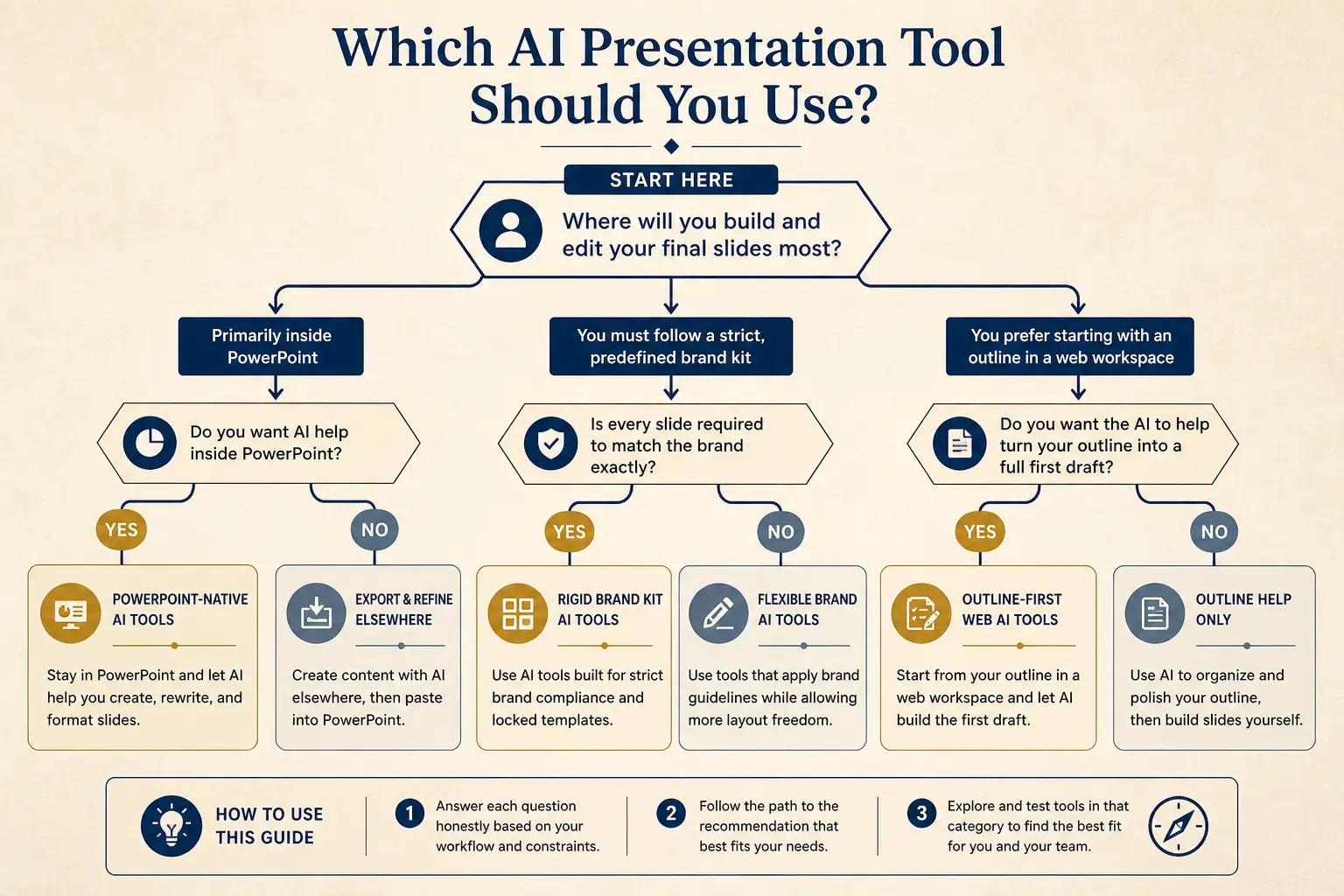
Need native PowerPoint editing every day?
Yes → Plus AI / Copilot · No → continue
Need rigid brand kits across a large team?
Yes → Beautiful.ai / enterprise kits · No → continue
Need outline-first AI drafting + present link?
Yes → Gamma
The CLAIM framework for AI decks
Most AI presentation makers fail because they optimize for filled frames, not for decisions. Use CLAIM as a preflight before you generate: Constraint (time and audience), Line of argument (the three beats that must land), Ask (the decision or takeaway), Inputs (metrics, quotes, names you already trust), and Must-cuts (topics that belong in appendix or email). If any letter is blank, pause. Generating without CLAIM is how you get ten slides titled Overview, Features, Benefits, and Next Steps.
- Constraint, write the minute budget and who is in the room. A twelve minute exec skim is not a forty minute workshop.
- Line, list three title candidates that would still make sense if the body copy never loaded.
- Ask, name the owner, the binary or short list of options, and the date. Thanks is not an ask.
- Inputs, paste real numbers. Invented traction is worse than a blank proof slide.
- Must-cuts, park history, org charts, and feature tours unless they change the decision.
Outline-first versus slide soup
Most AI slide tools jump straight to layouts. That produces slide soup: ten visually busy frames that do not accumulate into an argument. An AI presentation maker worth using forces a narrative spine first—sections, claims, proof, and the ask—then binds design to that spine. Practical test: read only the slide titles out loud. If they form a coherent story without the body copy, the outline worked. If titles are interchangeable, you still have soup.
Gamma’s loop is rewrite the outline, regenerate weak sections, then edit headlines until the title-only read lands. Regenerating a section is cheaper than redesigning ten slides after you realize the story was wrong. Design polish belongs after proof is on the claim slides, not before.
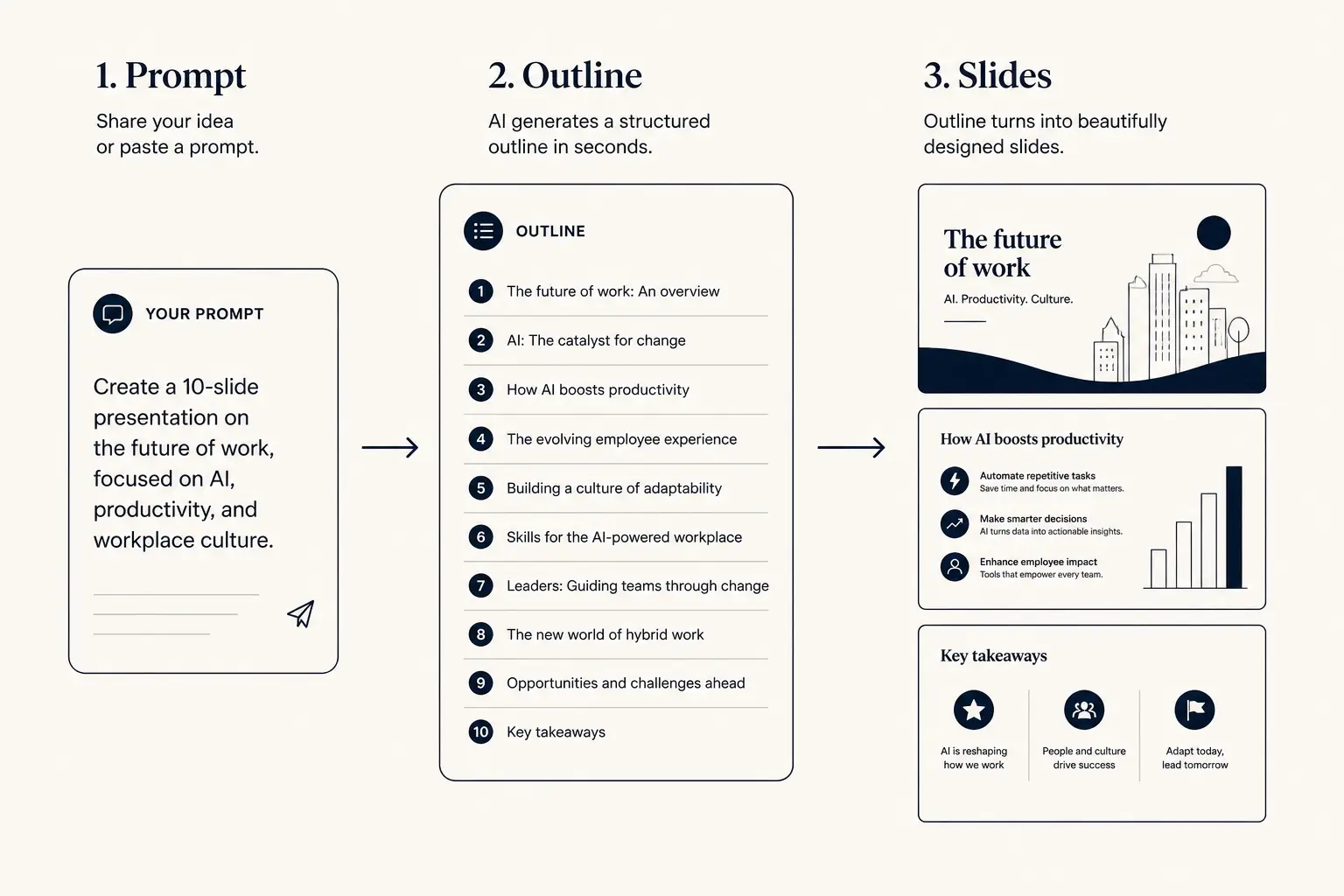
Prompt → outline → slides
1. Prompt
Audience, goal, length, proof you already have.
2. Outline
- • Opening claim
- • Proof beats
- • Ask / next step
3. Slides
How Gamma works end to end
- Brief, audience, goal, length, and any must-include proof. Use CLAIM so the model is not guessing your stakes.
- Outline, section order and claims you can reject before slides appear. Kill tourism sections here.
- Slides, layouts filled from the outline, still fully editable. Treat this as draft one, not ship.
- Present or export, share a link for live rooms, or pull PDF, PPTX, or PNG on Pro when the room needs a file.
Time-to-usable-deck
Blank PPT path
Outline in docs → design fight → rebuild → 3–8 hours
Outline-first AI path
Prompt → edit outline → generate → polish → minutes to first usable draft
Outline preview
- Narrative, open with 12-minute Q3 leadership update for a
- Body, 3–5 slides that carry the argument
- Close, summary, risks, and the ask
Preview only, Gamma expands this into editable slides.
Size the deck before you write the prompt
Slide count is a planning decision, not a decoration preference. High stakes rooms still need fewer narrative slides and denser appendix packs. Low stakes updates can run leaner. Use the calculator, then paste the generated prompt into Gamma so the model inherits your minute budget instead of inventing an eighteen-slide tour.
Slide budget calculator
Get a realistic slide count from meeting length and stakes, then open a matching prompt in Gamma.
14
Total slides
10
Core narrative
4
Appendix
Create a 14-slide deck for executives who skim. Meeting length: 12 minutes. Stakes: medium. Use an outline-first structure with 10 core narrative slides and 4 appendix slides. Every slide needs one claim and proof.
Open this budget in GammaWorked example: product review that decides
Scenario: you are a PM presenting Feature X to eng and design leadership. Meeting length is eighteen minutes. Decision needed today is ship, hold, or kill. You have adoption at 22 percent of weekly actives over thirty days, support tickets up 18 percent on onboarding step three, and two open reliability risks with owners. Bad prompt: make a nice product presentation about Feature X. Good prompt names the room, the binary ask, the metrics, and what to omit.
Expected outline spine: context and stakes, metric scorecard, user evidence, risks with owners, options with tradeoffs, decision ask with date. Alternate claim slides and proof slides so leadership is never stuck admiring decoration. Delete the history-of-the-project section unless it changes the ship call. Put the reliability risks before the ask so the room cannot pretend they were surprised.
| Slide | Claim to prove | Proof you bring |
|---|---|---|
| Stakes | Holding Feature X costs retention in onboarding week one | Time-to-value delta of 2.4 days versus control cohort |
| Scorecard | Adoption is real but support load is rising with it | 22 percent WAU adoption; tickets up 18 percent on step three |
| Risks | Two reliability risks block a clean ship recommendation | Owner, severity, and mitigation date on each risk row |
| Ask | Approve hold for fourteen days with a named re-review | Options table: ship now, hold, kill—with tradeoffs filled |
Anatomy of a claim slide
Claim headline (one idea)
Supporting line that states the so-what for this audience.
Source / footnote
Rewrite weak bullets before you polish
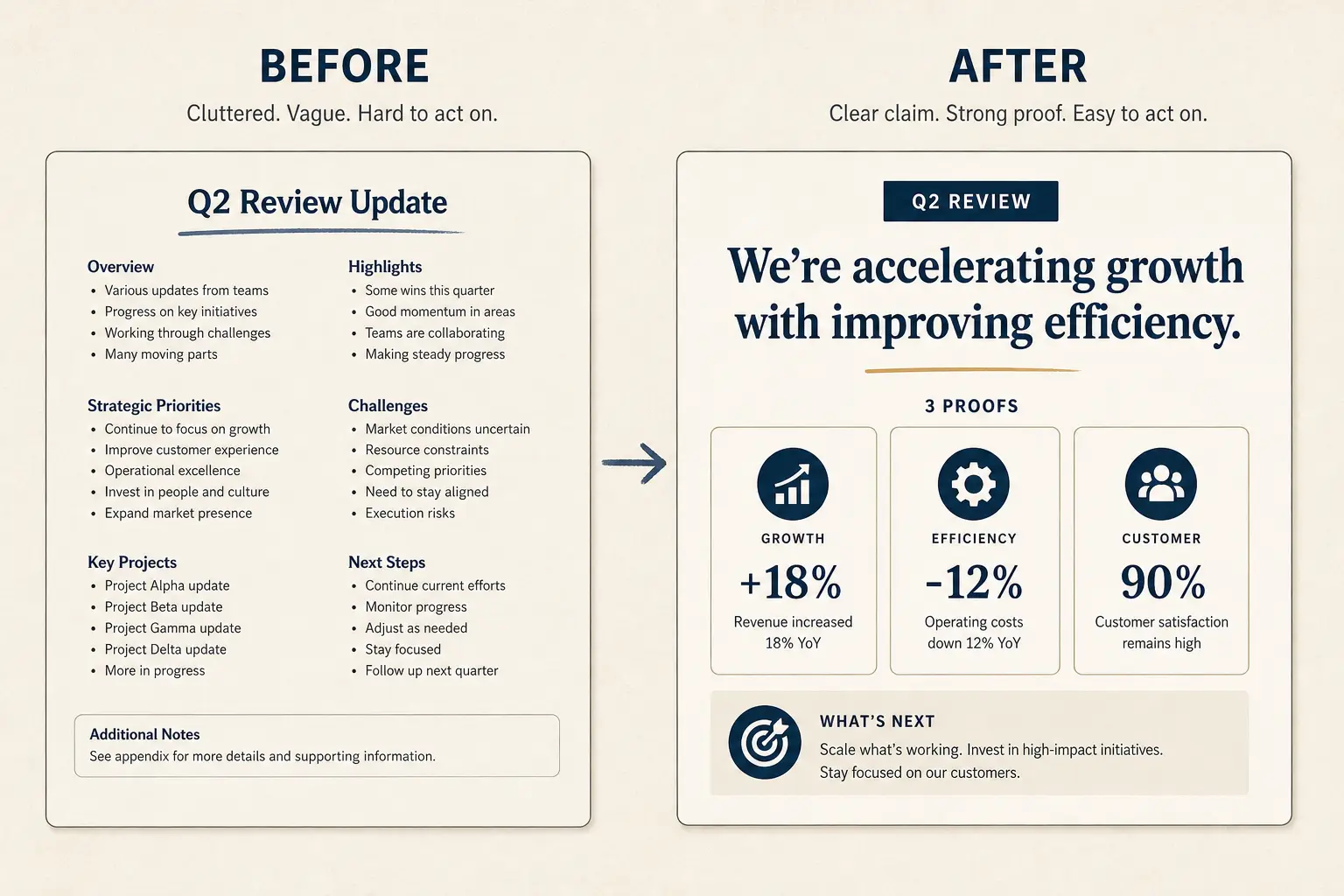
Paste a bad slide into the rewriter below. The pattern is always the same: open with the cost of inaction, support with a number or named example, close with a decision. Then drop that structure into Gamma as the outline for that section. Do not spend twenty minutes on accent colors while the title still says Overview.
Weak bullets → claim/proof/ask
Paste a bad slide. Get a rewrite pattern you can drop into Gamma, not vibes, a structure.
- Claim: Overview (make the cost of inaction obvious)
- Proof: Features (add a number, name, or constraint)
- Proof: Benefits (add a number, name, or constraint)
- Ask: Next steps (one decision, one owner, one date)
Mini comparison by job
Job-based, not feature bingo. Full write-ups live on Compare; scoring axes are public on Method. Use this table only to pick a starting path, then validate against your actual constraint.
| Job | Gamma | Typical AI slide tools |
|---|---|---|
| Narrative structure | Outline-first editable spine you can reject before layouts | Jump to layouts with weak title spines and interchangeable labels |
| Editing after gen | Full slide and outline edit loop without regenerate-or-accept | Often regenerate entire decks when one section is wrong |
| Presenting | In-app present link keeps the newest edits in the room | Usually export-first, which creates version drift by email |
| Rigid brand kits | Not the primary bet—choose a kit tool if that is the constraint | Some tools specialize in locked masters and brand governance |
Present and export without version chaos
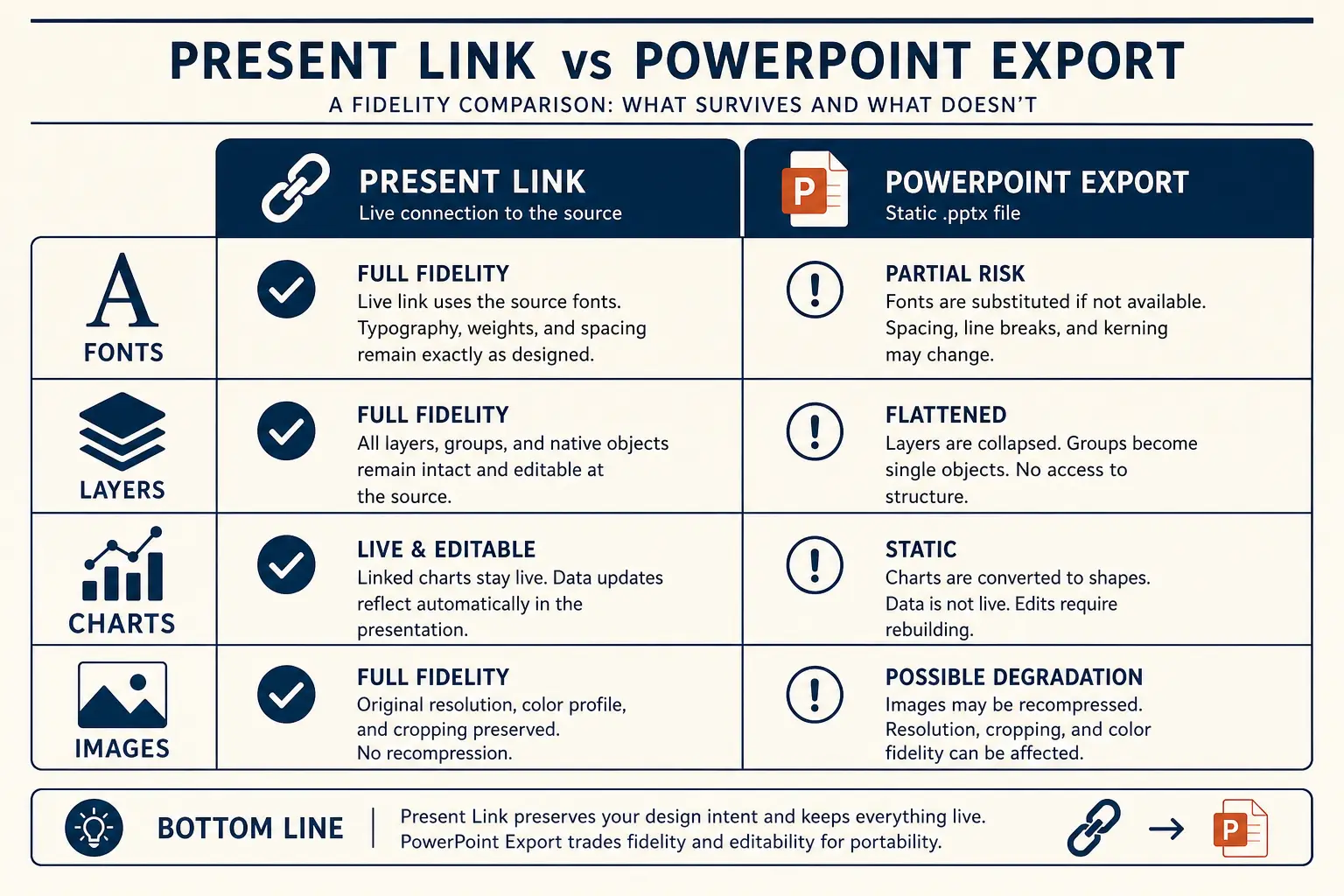
For most internal meetings, present from Gamma: the latest edits stay live, and you avoid version drift across email attachments. Export when procurement, offline venues, or a PowerPoint-centric review process requires a file. Free plans cover drafting and presenting in-app; Pro unlocks PDF, PPTX, and PNG export—see Plans. If you know the room needs PPTX, read export to PPTX before you pack every slide with delicate overlays.
Present link vs PPTX fidelity
Present link
- • Live latest edits
- • Best for your room
- • Analytics-friendly
Export PPTX / PDF
- • Offline / procurement
- • Brand review in PPT
- • Expect cleanup passes
Density checklist before you call it done
Run this pass before any design review. It catches most AI presentation maker failures without arguing about fonts.
- One idea per slide—if you need and in the title, split or cut the slide.
- Every claim slide has a proof neighbor within one click in the narrative: metric, quote, or named example.
- No orphan charts: the title states the takeaway, not a noun like Revenue or Adoption.
- Closing slide names the owner, date, and decision—not Thanks or Questions.
- You can delete twenty percent of slides and the story still stands for someone who arrived late.
- Appendix holds detail that supports diligence, not slides you were afraid to cut from the live path.
Slide density spectrum
Sparse
Live stage
1 claim, huge type
Balanced
Default
Claim + 3 proofs
Dense
Leave-behind
Detail for async read
Failure modes to cut on sight
- Prompt without a decision—deck about Q3 yields tourism slides. Name the ask and the owner.
- Accepting every generated section—cut anything that does not advance the argument or the decision.
- Decorating before proof—get numbers and quotes on claim slides before you fuss with accents or icon rows.
- Skipping the title-only read—if titles do not tell the story, neither will the room under time pressure.
- Shipping the first generate—treat generation as a junior draft: useful, incomplete, editable, never sacred.
- Keyword soup in the brief—repeating AI presentation maker ten times does not improve structure; CLAIM does.
For deeper craft, start at AI presentations, browse annotated examples, or follow the step-by-step on create a presentation with AI. Fundraising-shaped work belongs on the AI pitch deck generator. Design craft beyond structure lives under presentation design.
Prefer a reusable starting spine? Browse presentation templates for job-shaped outlines you can paste into Gamma and edit before polish.
Frequently asked questions
Draft your next deck with structure
Open Gamma, describe the audience and the decision you need, and edit an outline-first draft instead of starting from slide soup.