Learn
Learn presentation craft with Gamma
Presentation craft is a set of jobs, not a single template. These hubs cover the structures and workflows we see most: fundraising pitches, sales conversations, product and exec reviews, design principles, AI drafting, classroom talks, and ops pipelines like notes-to-slides. Start with the job you have this week, then go deeper into spokes.
Learn pages teach decisions. Money pages (AI presentation maker, pitch, sales, board) are product entry. Examples show annotated shapes. Method explains how we score tools. The blog goes narrower on stage, industry, and migration scenarios.
Which tool for which job
Need native PowerPoint editing every day?
Yes → Plus AI / Copilot · No → continue
Need rigid brand kits across a large team?
Yes → Beautiful.ai / enterprise kits · No → continue
Need outline-first AI drafting + present link?
Yes → Gamma
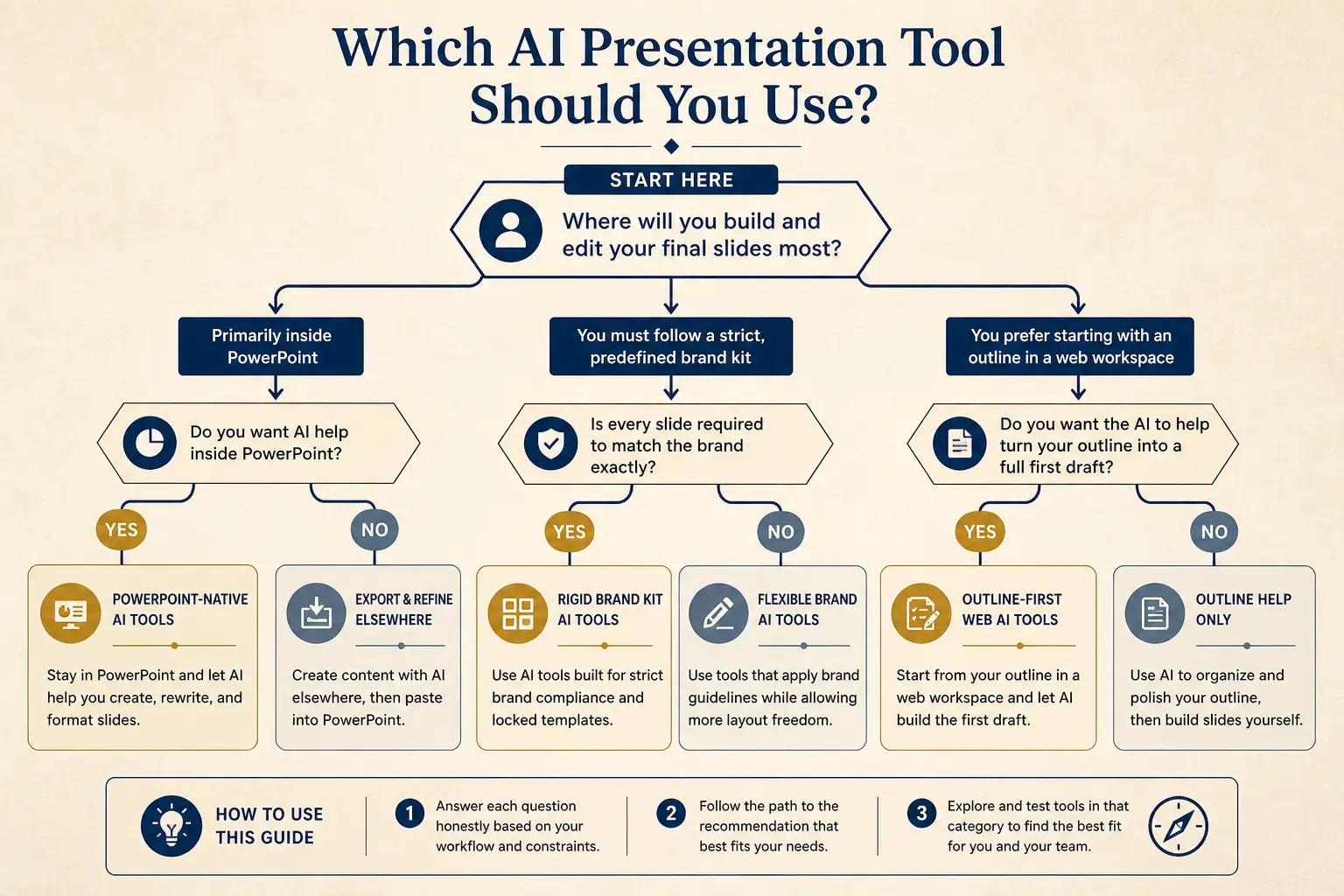
Find your path in three questions
If you are not sure which hub to open, answer the quiz. It routes to a product page matched to pitch, sales, internal decision, or teaching — and flags when PPTX is the real constraint. Rigid brand kits get an honest pointer toward compare reading, not a fake “Gamma always wins.”
What deck are you actually making?
Three questions. One recommended path, no generic “it depends” fog.
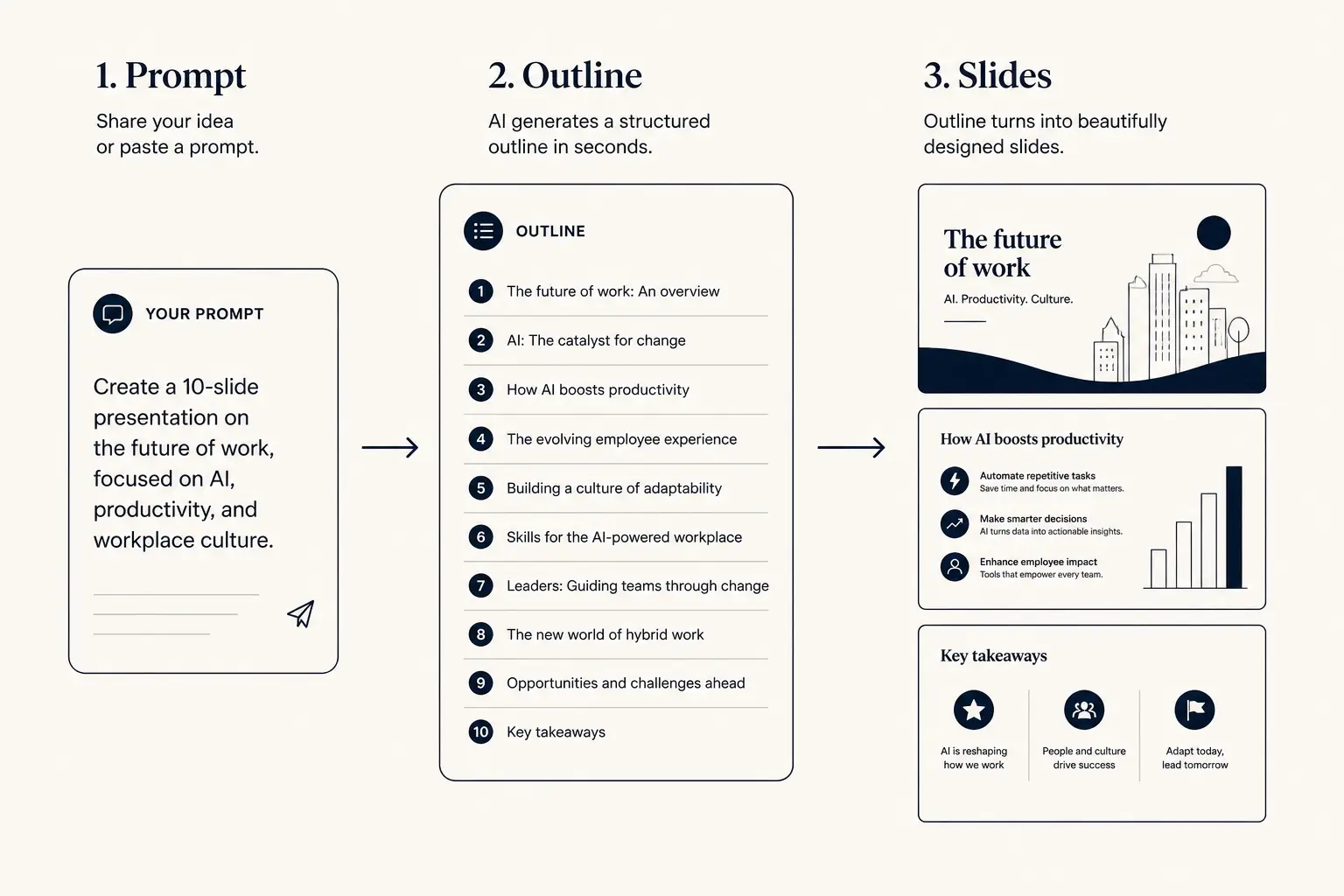
Prompt → outline → slides
1. Prompt
Audience, goal, length, proof you already have.
2. Outline
- • Opening claim
- • Proof beats
- • Ask / next step
3. Slides
The eight hubs
Each card below is a cluster home. Open the hub for frameworks and failure modes; open the linked spoke when you need a deeper guide. Do not skim all eight, finish one job end-to-end, including a real draft in Gamma.
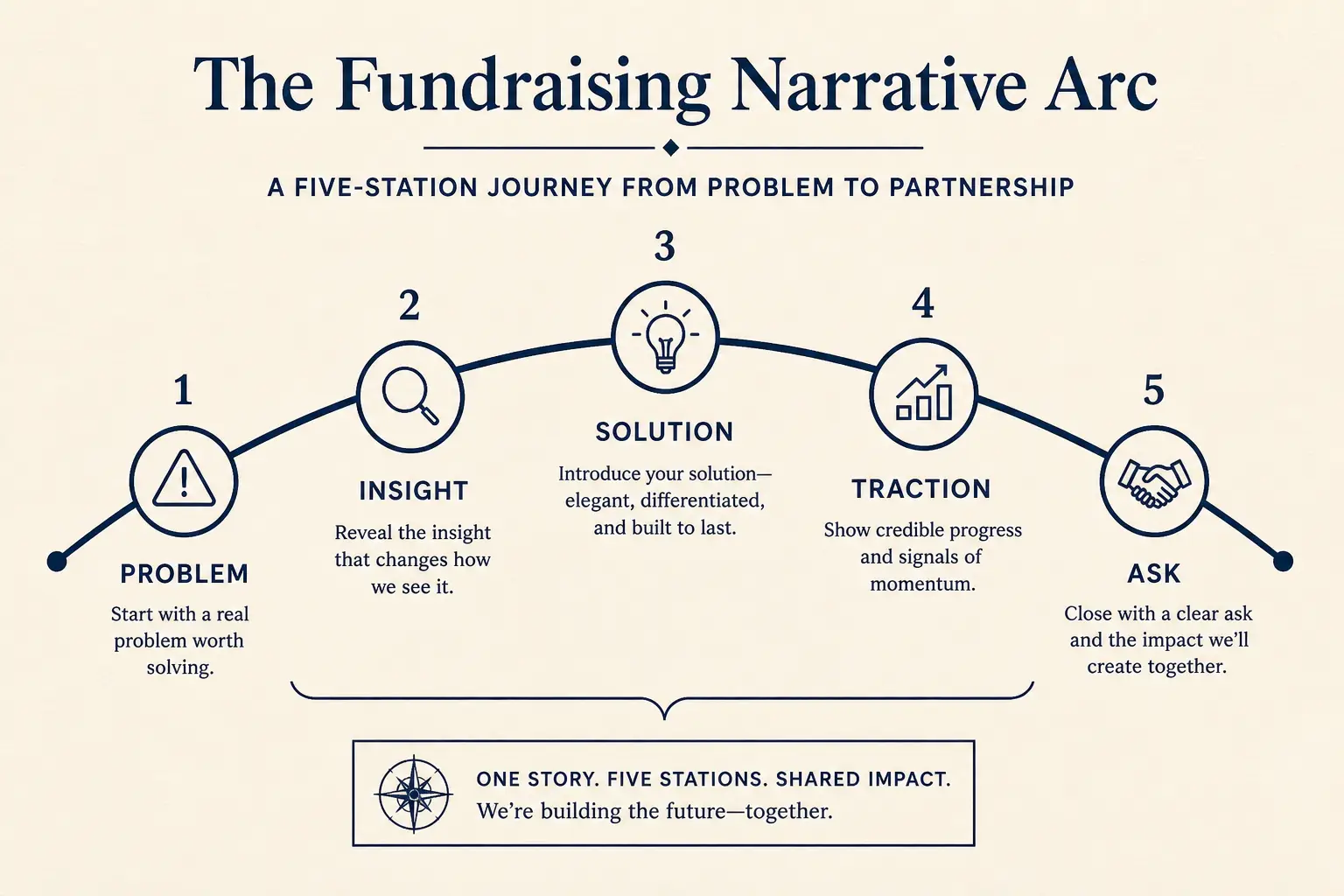
Pitch decks that raise meetings
Pitch deck structure, annotated examples, and AI workflows for fundraising, from pre-seed through Series A with clearer asks and metrics.
Start with structure and the ask slide before you polish visuals.
Failure mode: Series A templates reused for seed, empty slides.
Deep dive: Pitch deck structure
Sales presentations that close deals
Sales deck structure, proposals, demos, and ROI slides, with AI workflows that stay buyer-specific instead of shipping feature dumps.
Start from discovery language and a concrete next step.
Failure mode: feature catalogs sent as leave-behinds.
Deep dive: Sales deck structure
Product & executive review decks
Product reviews, roadmaps, QBRs, and executive updates, decision-ready slides that clarify bets, tradeoffs, and the ask for the room.
Lead with the decision, options, and owners, not ticket volume.
Failure mode: metrics without a recommendation sentence.
Deep dive: Product review deck
Presentation design principles that work
Slide hierarchy, density, data slides, and speaker notes, craft that holds attention and makes AI-generated decks look intentional.
Fix claim titles before color, icons, or motion.
Failure mode: decorating a confused outline.
Deep dive: One idea per slide
AI presentations: guides & workflows
What AI presentations are, how outline-first workflows win in 2026, and how to prompt for decks that edit cleanly instead of looking generic.
Outline first; inject proprietary facts before layouts.
Failure mode: accepting invented metrics because they sound fluent.
Deep dive: Outline-first workflow
Fundraising decks & investor updates
Investor updates, board vs pitch decks, and checklists for raising with clarity, practical systems founders can reuse every month.
Separate pitch, update, and board artifacts, different rooms.
Failure mode: pitch storytelling inside a fiduciary board pack.
Deep dive: Investor update template
Classroom & student presentation guides
Structure class talks, lectures, and research presentations with AI, without generic slides that lose the teaching point mid-deck.
Map every section to a learning objective and a time budget.
Failure mode: corporate template cosplay with no pedagogical spine.
Deep dive: Classroom talk structure
Presentation workflows from notes to PPTX
Notes to slides, PDF to deck, export to PPTX, and team review rituals, practical pipelines for shipping decks without reformatting chaos.
Pick the output artifact early: present link, PDF, or PPTX.
Failure mode: paginating a PDF into twenty near-duplicate slides.
Deep dive: Notes to slides workflow
A practical learning path
Week one: pick one hub and one upcoming meeting. Read the hub’s structure section, open one spoke, recreate an example with your facts. Week two: force an edit and decide present link vs export using the workflows hub. Week three: run your draft through the rubric as if you were evaluating a tool, Structure and Editability usually surface the real gaps.
Teams learn faster with a review ritual than with more templates. Agree on three checks before taste feedback: Is the ask clear? Are metrics defined? Can we cut 20%? Late reviews that only rearrange pixels waste the craft these hubs teach.
Time-to-usable-deck
Blank PPT path
Outline in docs → design fight → rebuild → 3–8 hours
Outline-first AI path
Prompt → edit outline → generate → polish → minutes to first usable draft
What this index is not
This is not a course with certificates. It is not a dump of every slide tip on the internet. It is a map from job → hub → spoke → draft. If you need rigid brand systems as your primary constraint, read compares before you standardize. If you already have a finished deck and only need micro-edits inside PowerPoint, a PPT-native assistant may be enough — and the quiz will push you toward export guidance rather than a full rewrite.
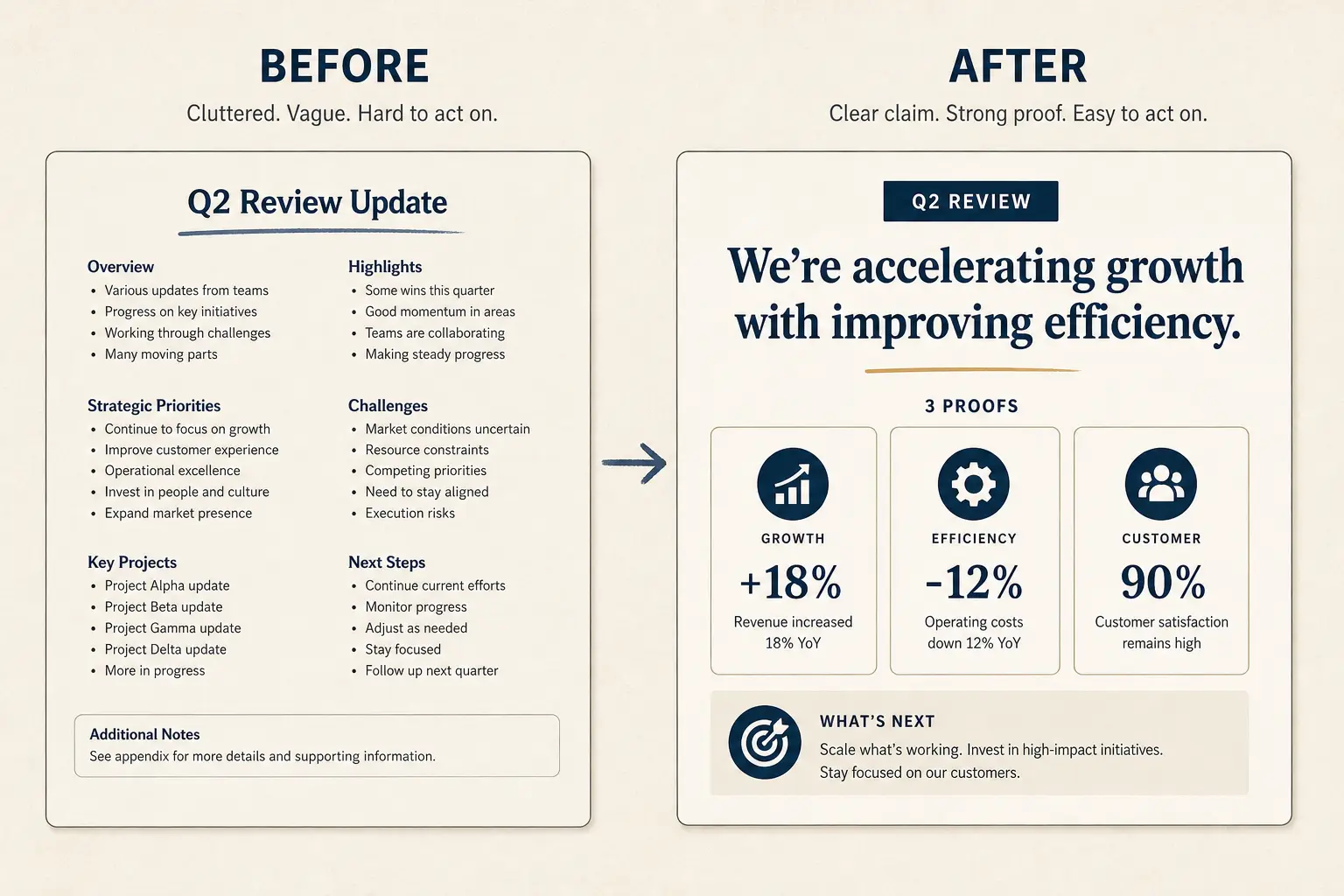
Weak slide → strong slide
Before
- • Overview
- • Features
- • Next steps???
After
- • Cost of status quo
- • Wedge in one claim
- • Proof + decision ask
Frameworks, worked rules, and cuts
Presentation craft is a set of jobs, not a single template. The learn index maps eight hubs covering fundraising pitches, sales conversations, product and exec reviews, design principles, AI drafting, classroom talks, and ops pipelines. Start with the job you have this week, then go deeper into spokes. Do not skim all eight hubs as entertainment; finish one job including a real draft.
Original framework: Job, Hub, Spoke, Draft. Name the meeting. Open the matching hub. Read one spoke. Recreate an example with your facts. Force an edit. Decide present link versus export. That path beats collecting unused templates. The deck job quiz routes pitch, sales, internal decision, and teaching paths without generic it-depends fog.
Worked learning path: week one pick one hub and one upcoming meeting, recreate an example with real facts. Week two force an edit and decide artifact type using the workflows hub. Week three run your draft through the five-axis rubric as if evaluating a tool. Structure and Editability usually surface the real gaps faster than Design debates.
Learn pages teach decisions. Money pages are product entry. Examples show annotated shapes. Method explains scoring. The blog goes narrower on stage, industry, and migration scenarios. Keep those layers distinct so you do not treat a long-tail post as a full craft system or a hub as a checkout page.
Teams learn faster with a review ritual than with more templates. Agree on three checks before taste feedback: Is the ask clear? Are metrics defined? Can we cut twenty percent? Late pixel rearrangement wastes the craft these hubs teach. Assign owners for facts and narrative when AI drafts enter the building.
Failure modes for using this index include reading without drafting, forcing every deck into a pitch arc, ignoring artifact constraints, and treating Gamma as always winning when rigid brand kits or PowerPoint-native micro-edits are the real constraint. The quiz will push export guidance when files dominate.
Not for you if you need a certificate course, if you want a dump of every slide tip on the internet, or if your organization forbids new drafting tools without procurement. Use compares and method when buying. Use hubs when shipping a meeting. Treat this index as a map, not a syllabus.
Concrete next step: answer the three quiz questions, open the recommended path, generate an outline for a real meeting on the calendar this week, and do not collect a second hub until that draft has survived a forced edit. Learning sticks when a usable deck ships for a named room.
Hub cards list a start-here move and a common failure mode for a reason. Use those two lines as a filter before you open spokes. Pitch fails on stage-mismatched templates; sales fails on feature catalogs; product fails on metrics without recommendations; design fails on decorating confused outlines. Match the failure you actually have.
When AI drafts enter a team, separate fact ownership from narrative ownership in writing. Fluent slides with orphan metrics create a new org failure mode. The hubs teach claim spines; they do not replace a source-of-truth sheet. Paste numbers last, after the outline claims are honest.
Artifact choice belongs in week two of the learning path, not as an afterthought the night before. Present links favor latest edits; PDFs favor durable pre-reads; PPTX favors rooms that require PowerPoint as system of record. The workflows hub exists so you stop designing motion that export will kill.
Use compares when the question is which seat to buy; use this index when the question is which craft system to practice. Mixing those questions produces trophy shopping and unread hubs. If procurement is the blocker, pause drafting practice and open method with a dated brief instead of skimming eight cluster homes.
Education and workflows hubs are easy to skip if your job feels commercial. Skip them and you still hit the same failure modes: handouts pasted onto slides, or PDF pagination dressed as a deck. Open them when the room is a classroom or the input is a document dump.
Pitch and fundraising hubs are neighbors, not twins. Open pitch when the room does not know you yet. Open fundraising when believers need cadence and board decisions. Using one hub for both jobs is how founders send marketing into fiduciary rooms.
Learn by drafting
The fastest way to internalize structure is to generate a deck for a real meeting and edit it.