Learn · Workflows
Export AI slides to PPTX without breaking hierarchy
PPTX export breaks when decks rely on web-only layout tricks, oversized hierarchies, or last-minute artifact switches. The fix is designing for the export path early: simpler stacking, explicit headings, fewer overlapping elements, and a cleanup checklist after export. This guide is for teams who must hand PowerPoint to clients, boards, or brand reviewers without a weekend of untangling.
Parent guide: workflows hub. Method notes: how we evaluate decks. Product entry: AI presentation maker.
Export-first design rules
Rules that survive PPTX: one primary claim headline; body stacked under it; max three proof points; images in reserved frames; avoid text on busy photos; avoid overlapping chips; keep footers clear; prefer system-safe fonts when partners require them.
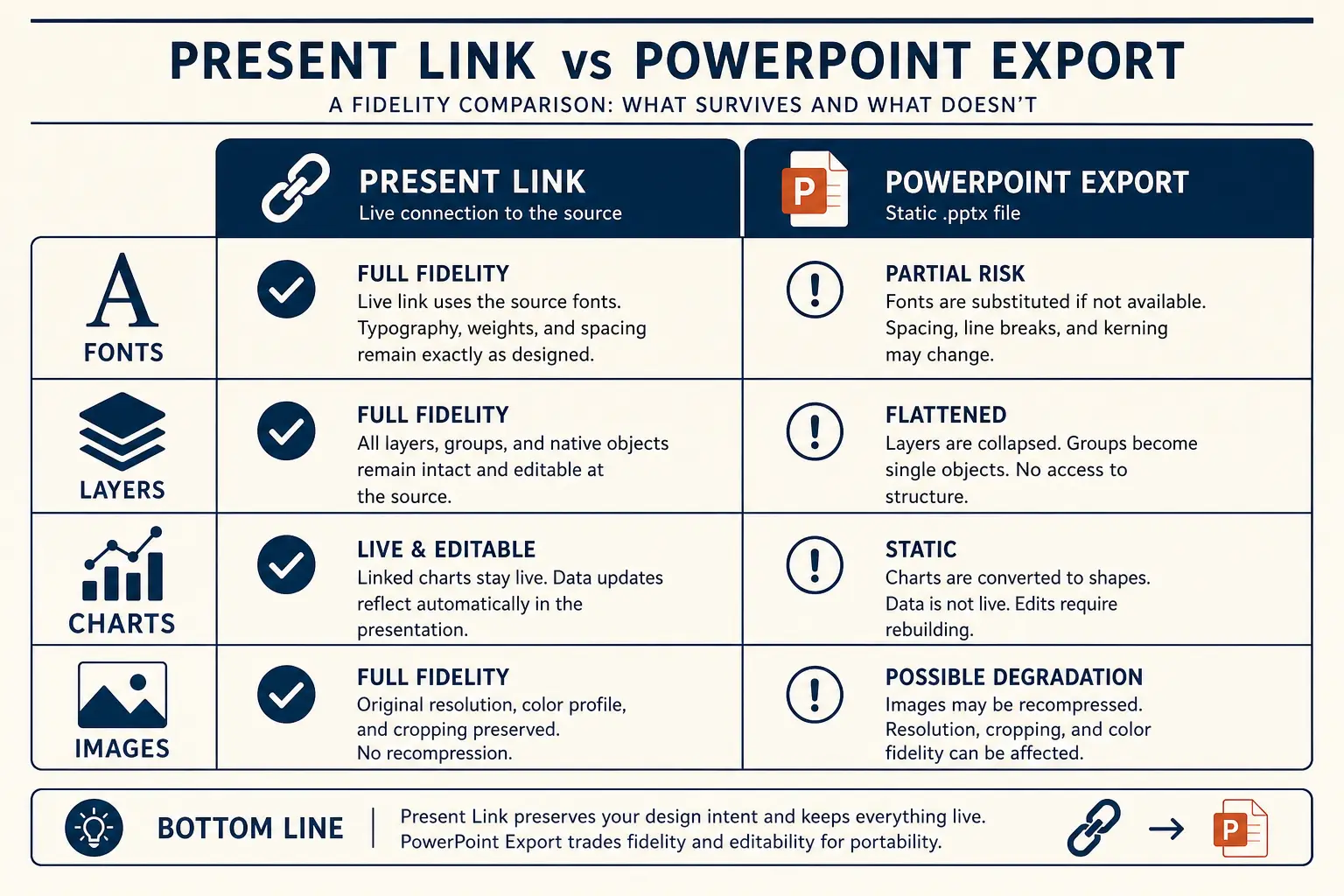
If a layout only works with fragile absolute positioning, it is a present-link layout, not an export layout. Decide artifact type before visual complexity.
Export fidelity is a design constraint equal to brand color. Treat it that way.
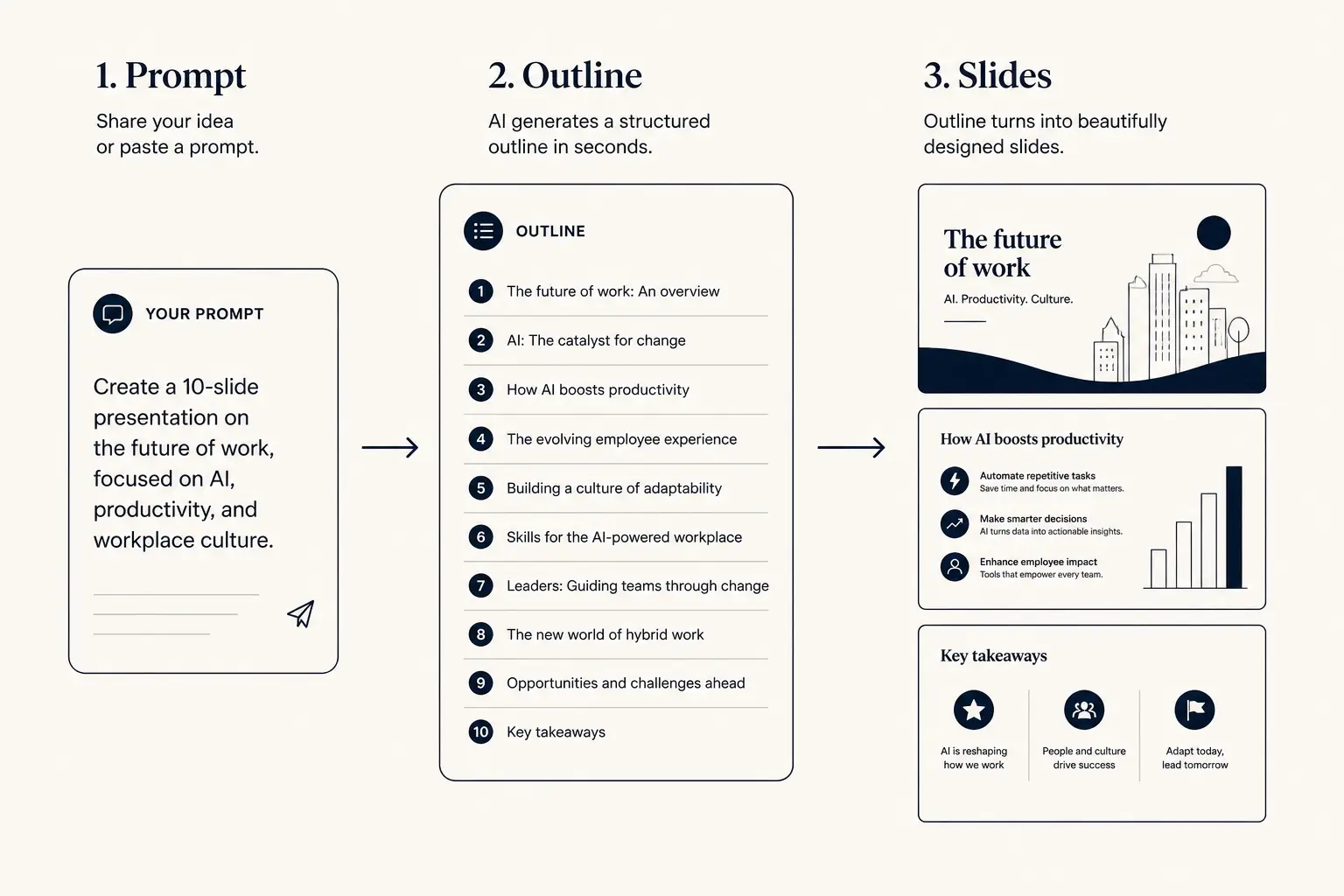
Fundraising narrative arc
Tension early. Proof before the ask. Titles should skim as a story.
Who needs this spoke
Agencies delivering editable sources, founders sending decks to associates who live in PowerPoint, enablement teams maintaining master PPTX libraries. Not for: teams who can present from a link and never need files, they should not pay complexity taxes.
If procurement requires PPTX markup, you are in this spoke’s world. If you only need a freeze, PDF may be enough.
Do not optimize for PowerPoint “just in case.” Optimize for the artifact you will actually ship this week.
Time-to-usable-deck
Blank PPT path
Outline in docs → design fight → rebuild → 3–8 hours
Outline-first AI path
Prompt → edit outline → generate → polish → minutes to first usable draft
Worked example: board appendix export
Situation: a Series A company presents live from Gamma but the board packet must include an editable PPTX appendix for the finance committee. Live narrative is twelve slides; appendix is eight denser slides.
Wrong: export the live cinematic deck and hope. Overlaps break; fonts substitute; charts shift. Right: maintain an export twin with simpler masters; test export every Thursday before board week; cleanup checklist owned by the chief of staff. Result: finance edits assumptions without breaking title hierarchy.
Two densities, two purposes, same claims. That is operational maturity.
Evaluation rubric axes
Outline preview
- Narrative, open with Rebuild this deck outline for PPTX
- Body, 3–5 slides that carry the argument
- Close, summary, risks, and the ask
Preview only, Gamma expands this into editable slides.
Cleanup checklist after export
Open in PowerPoint immediately. Check: font substitution, title wrapping, bullet indentation, image crops, logo clearance, footer collisions, chart axis labels, master slide consistency, dark-on-dark contrast, and broken hyperlinks.
Fix hierarchy before colors. If more than three slides need structural rebuild, simplify in Gamma and re-export rather than fighting file entropy.
Checklist time is cheaper than discovering breaks in the client’s first open.
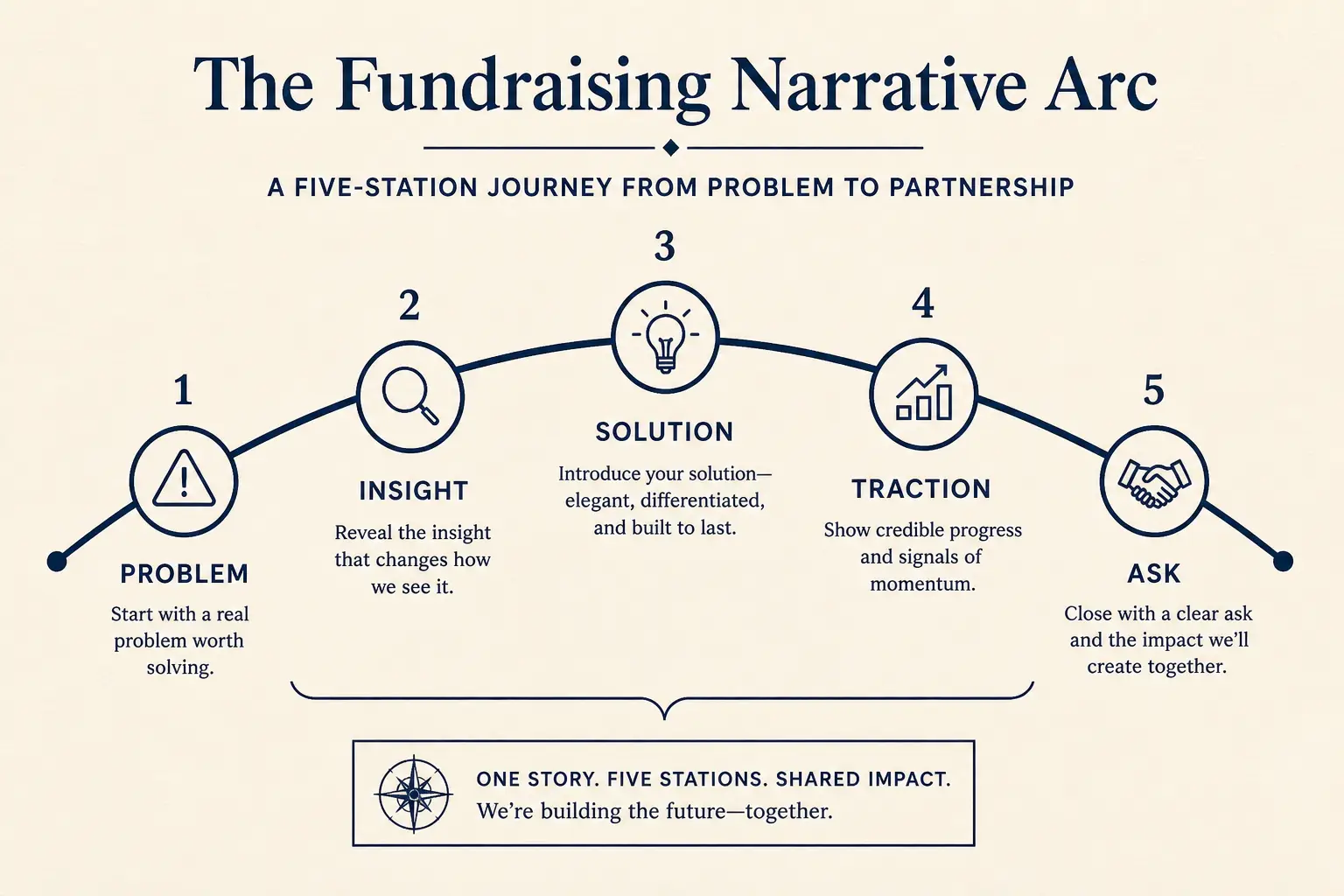
Prompt → outline → slides
1. Prompt
Audience, goal, length, proof you already have.
2. Outline
- • Opening claim
- • Proof beats
- • Ask / next step
3. Slides
What to simplify before you export
Remove stacked cards that depend on perfect alignment. Convert icon+chip clusters into plain bullets. Pull text out of images. Reduce columns from three to two. Increase type size even if it forces content cuts.
Use before/after rewrite on titles if export wrapping destroys meaning. Cuts that improve export often improve comprehension too.
If simplification feels like losing “design,” you were decorating. Claims remain.
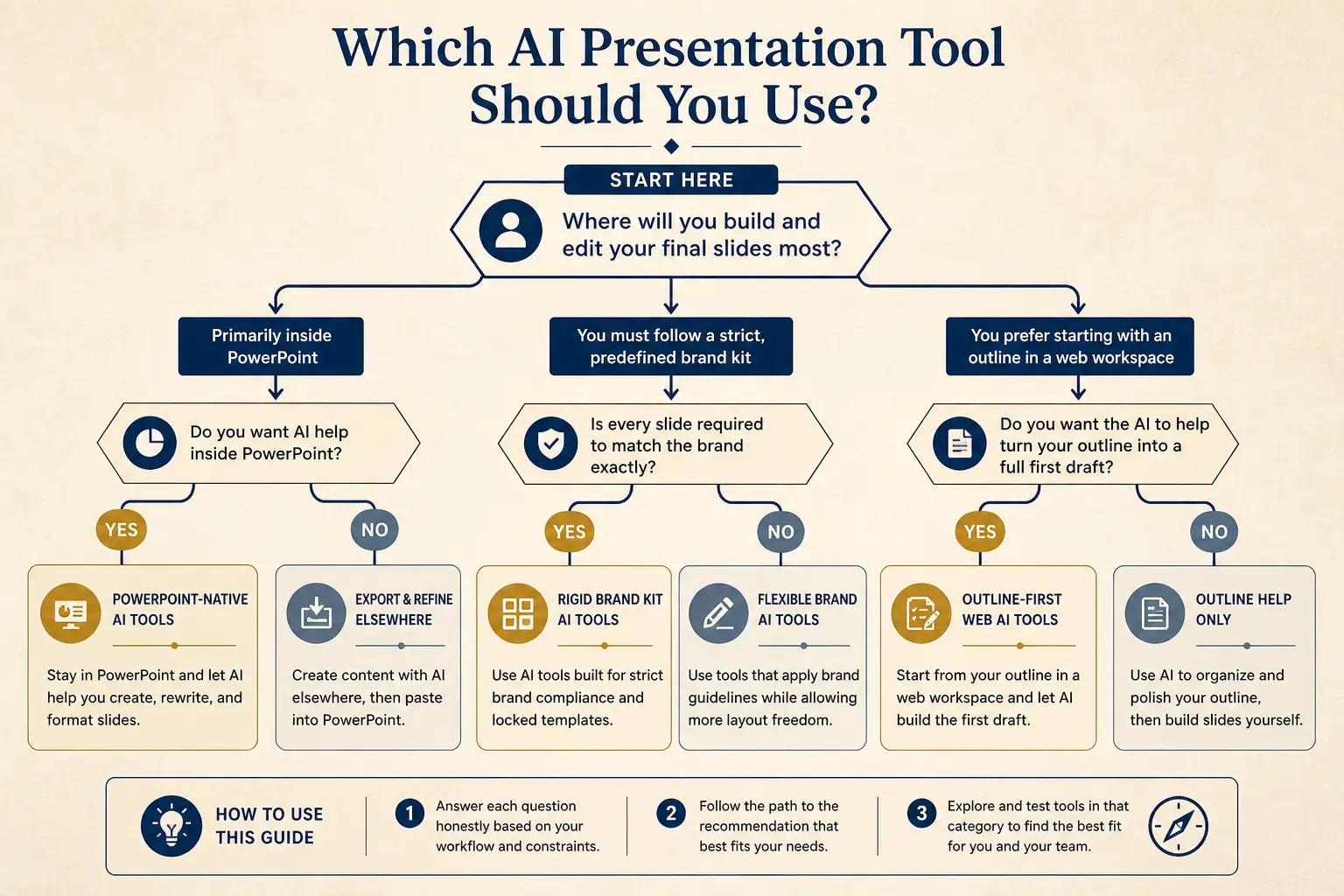
Which tool for which job
Need native PowerPoint editing every day?
Yes → Plus AI / Copilot · No → continue
Need rigid brand kits across a large team?
Yes → Beautiful.ai / enterprise kits · No → continue
Need outline-first AI drafting + present link?
Yes → Gamma
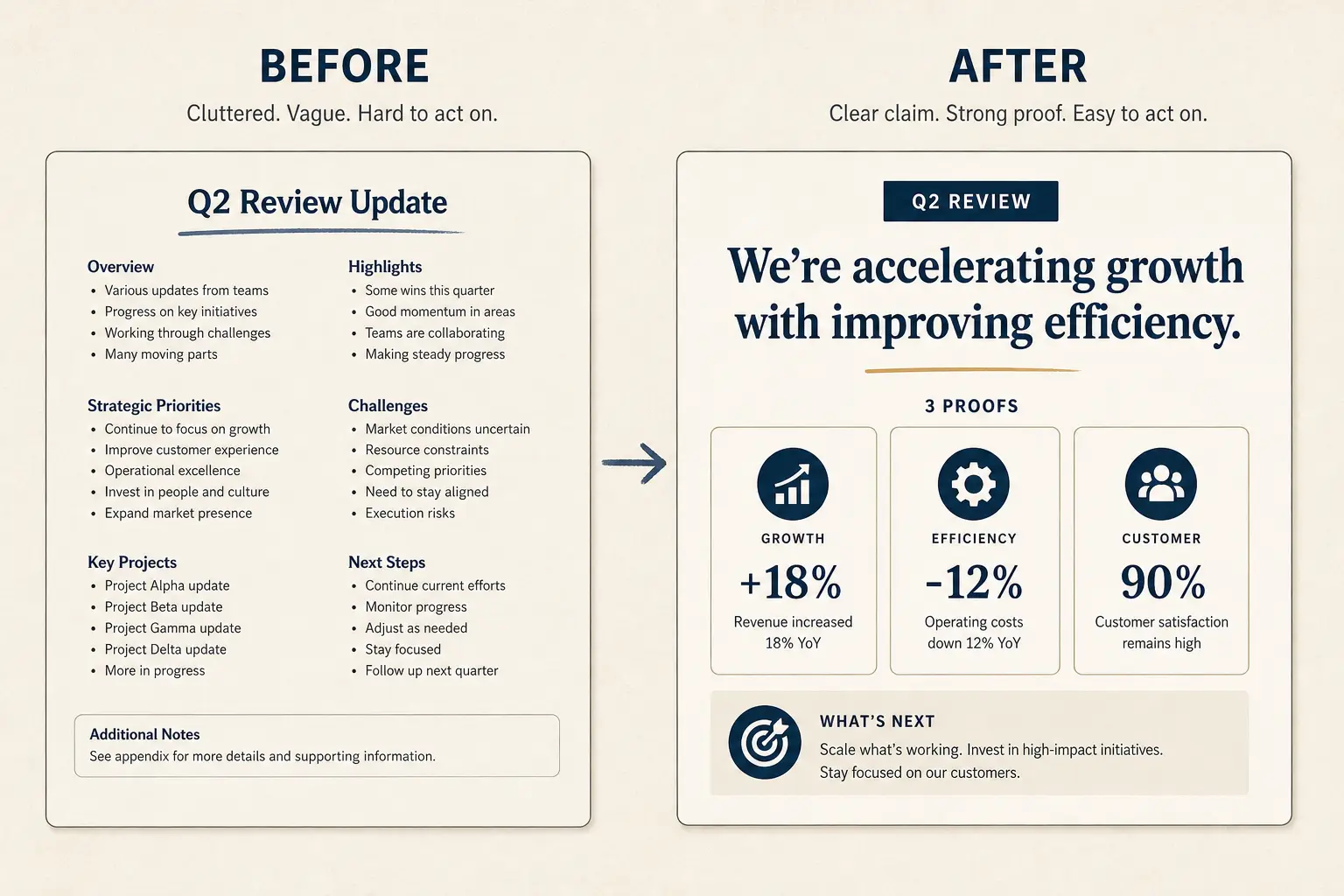
Weak bullets → claim/proof/ask
Paste a bad slide. Get a rewrite pattern you can drop into Gamma, not vibes, a structure.
- Claim: Huge overlapping text (make the cost of inaction obvious)
- Proof: Icons everywhere (add a number, name, or constraint)
- Proof: Tiny footnotes (add a number, name, or constraint)
- Proof: Decorative lines (add a number, name, or constraint)
- Ask: Hope it exports (one decision, one owner, one date)
Failure modes
Failure: designing for cinematic present mode then discovering PPTX is required tonight. Failure: custom fonts the client lacks. Failure: text in screenshots as the only copy. Failure: no human opened the exported file. Failure: version soup in email.
Name files with date and version. One owner for the export twin.
Export surprises are process failures that look like tool failures.
Anatomy of a claim slide
Claim headline (one idea)
Supporting line that states the so-what for this audience.
Source / footnote
Slide budget calculator
Get a realistic slide count from meeting length and stakes, then open a matching prompt in Gamma.
18
Total slides
13
Core narrative
5
Appendix
Create a 18-slide deck for executives who skim. Meeting length: 15 minutes. Stakes: medium. Use an outline-first structure with 13 core narrative slides and 5 appendix slides. Every slide needs one claim and proof.
Open this budget in GammaBrand review realities
Brand teams often require PPTX because their comments live there. Give them an export-safe twin and a short handoff note: what is locked, what they can change, and known limitations. Do not hand them a fragile web layout and call it stubbornness when they break it.
Agree on font packs ahead of time. If brand kits are rigid across a huge org, evaluate whether a brand-kit-first tool fits better, honesty beats loyalty theater.
Compare options using Method rubrics when export is a hard requirement.
When not to export
If you control the room and need latest numbers, present from a link. If you need a freeze without edits, PDF. Export PPTX when editability for others is the job.
See present-link vs PPTX for the full matrix. Switching artifact type the night before creates avoidable thrash.
The best export is sometimes no export.
AI PowerPoint generator pathing
If your primary keyword job is generating decks destined for PowerPoint, start from the AI PowerPoint generator path and still apply this cleanup checklist. Generation speed does not erase export physics.
Outline-first still applies. Test export on slide one of a new template before building twenty slides.
Templates should be export-proven, not only screenshot-pretty.
Gamma handoff
Simplify hierarchy in Gamma. Export PPTX. Run the checklist. Only then send. Keep a present-link twin for your own delivery if you still present live.
Return to the workflows hub for adjacent pipelines. Use team review ritual to include an export gate on high-stakes decks.
Clean PPTX is a designed outcome, not a button myth.
Operating rules for export-pptx-without-breaking
Treat Export AI slides to PPTX without breaking hierarchy as a constrained operating problem, not a theme exercise. The constraint set on this page, audience, proof rules, artifact choice, and cut list, is what makes the guidance non-generic relative to workflows hub.
Write the decision or learning outcome in one sentence before you touch Gamma. Paste only proof you can defend in Q&A; blanks beat fiction. Name the artifact (present link, PDF, or PPTX) in the outline header so design stays honest. Schedule one title-only skim with a second person when stakes are external. If a section cannot map to the framework on this page, cut it rather than decorating it.
The scenario details earlier on this URL earn the long-tail ranking; these rules keep execution from drifting back to generic AI output under deadline pressure.
Edit loops that save time on export-pptx-without-breaking
Most time waste happens after generation: endless theme tweaks while titles still fail a ninety-second skim. Invert the loop for Export AI slides to PPTX without breaking hierarchy: skim titles, fix claims, fill proof blanks, then adjust visual density for the chosen artifact.
Loop A (10 minutes): title-only skim and cuts. Loop B (15 minutes): proof fill and definition footnotes. Loop C (10–40 minutes): artifact readiness, including PPTX cleanup if required. Loop D (one pass): timed rehearsal or peer read for async leave-behinds. Stop when the decision or learning outcome is unmistakable to a skeptical reader.
If Loop C dominates every week, you are designing for the wrong artifact or carrying too much decorative hierarchy. Simplify the master instead of heroically cleaning exports forever.
Vocabulary lock for export-pptx-without-breaking
Generic AI slides drift into vendor vocabulary. Lock the words your audience already uses, course rubric language, buyer phrases from discovery, investor metric definitions, or committee method terms, and paste that glossary into the prompt as a constraint.
Build a ten-term glossary for this scenario before generating. Ban three fluffy phrases that always appear in weak drafts for this job. Require metric definitions on-slide when a skeptic could misread a chart. Prefer audience-native verbs over interchangeable corporate verbs. Keep the glossary next to the prompt template so updates are mechanical.
Vocabulary locks are how long-tail pages stay specific. Without them, every deck collapses into the same interchangeable AI tone.
Ship bar for export-pptx-without-breaking
Ship only when a skeptical reviewer can answer: what is the ask or learning outcome, what proof supports it, what did we cut, and which artifact is canonical. If any answer is fuzzy, you are not done, regardless of how polished the theme looks.
Ask or outcome is on a slide, not only in speaker notes. Proof inventory matches on-slide claims one-to-one. Failure-mode cuts from this page have been applied once. Permissions or file open tests completed for the delivery path. Owners and dates exist for follow-ups when the job is operational.
This bar is stricter than “looks fine.” Clear answers under skepticism are how Export AI slides to PPTX without breaking hierarchy work actually lands.
Gamma habit for export-pptx-without-breaking
In Gamma, keep the durable habit outline-first: paste a scenario-specific prompt from this page, lock titles, generate, regenerate weak sections with diff prompts, then present or export on purpose. Do not restart from a blank vibe prompt when a long-tail spec already exists for Export AI slides to PPTX without breaking hierarchy.
Keep a team library of A-tier prompts keyed to jobs like this URL. Store proof inventories next to decks so updates are mechanical. Prefer section regen over full rerolls when one metric changes. Link workflows hub from your internal wiki so people escalate to systems when they outgrow this scenario. Re-read Method when tool debates appear, architecture arguments need shared axes.
Day-to-day excellence is boring repetition of good constraints. This page supplies the constraints for one job; Gamma supplies the editable structure to execute them quickly.
Field notes 1 for export-pptx-without-breaking
When teams apply Export AI slides to PPTX without breaking hierarchy in the wild, the same friction shows up: rushed prompts, missing proof inventories, late artifact switches, and reviews that argue about taste instead of decisions. Field note 1 is a corrective habit, small enough to run weekly, strict enough to prevent cleanup debt.
Habit: freeze a proof inventory before any generate click, even when the calendar is cruel. Habit: run a ninety-second title skim with someone who was not in the working session. Habit: write the artifact choice in the outline header and refuse layout work that contradicts it. Habit: cut twenty percent after first rehearsal or first async read, on purpose. Habit: log one failure mode from this page that you actually hit, and patch the team template. Habit: prefer section regen with updated proof over full rerolls that reshuffle a working spine.
These habits are not motivational posters. They are the difference between AI that compresses work and AI that creates a second shift of cleanup. Attach them to workflows hub rituals so they survive personnel changes.
Field notes 2 for export-pptx-without-breaking
When teams apply Export AI slides to PPTX without breaking hierarchy in the wild, the same friction shows up: rushed prompts, missing proof inventories, late artifact switches, and reviews that argue about taste instead of decisions. Field note 2 is a corrective habit, small enough to run weekly, strict enough to prevent cleanup debt.
Habit: freeze a proof inventory before any generate click, even when the calendar is cruel. Habit: run a ninety-second title skim with someone who was not in the working session. Habit: write the artifact choice in the outline header and refuse layout work that contradicts it. Habit: cut twenty percent after first rehearsal or first async read, on purpose. Habit: log one failure mode from this page that you actually hit, and patch the team template. Habit: prefer section regen with updated proof over full rerolls that reshuffle a working spine.
These habits are not motivational posters. They are the difference between AI that compresses work and AI that creates a second shift of cleanup. Attach them to workflows hub rituals so they survive personnel changes.
Field notes 3 for export-pptx-without-breaking
When teams apply Export AI slides to PPTX without breaking hierarchy in the wild, the same friction shows up: rushed prompts, missing proof inventories, late artifact switches, and reviews that argue about taste instead of decisions. Field note 3 is a corrective habit, small enough to run weekly, strict enough to prevent cleanup debt.
Habit: freeze a proof inventory before any generate click, even when the calendar is cruel. Habit: run a ninety-second title skim with someone who was not in the working session. Habit: write the artifact choice in the outline header and refuse layout work that contradicts it. Habit: cut twenty percent after first rehearsal or first async read, on purpose. Habit: log one failure mode from this page that you actually hit, and patch the team template. Habit: prefer section regen with updated proof over full rerolls that reshuffle a working spine.
These habits are not motivational posters. They are the difference between AI that compresses work and AI that creates a second shift of cleanup. Attach them to workflows hub rituals so they survive personnel changes.
Field notes 4 for export-pptx-without-breaking
When teams apply Export AI slides to PPTX without breaking hierarchy in the wild, the same friction shows up: rushed prompts, missing proof inventories, late artifact switches, and reviews that argue about taste instead of decisions. Field note 4 is a corrective habit, small enough to run weekly, strict enough to prevent cleanup debt.
Habit: freeze a proof inventory before any generate click, even when the calendar is cruel. Habit: run a ninety-second title skim with someone who was not in the working session. Habit: write the artifact choice in the outline header and refuse layout work that contradicts it. Habit: cut twenty percent after first rehearsal or first async read, on purpose. Habit: log one failure mode from this page that you actually hit, and patch the team template. Habit: prefer section regen with updated proof over full rerolls that reshuffle a working spine.
These habits are not motivational posters. They are the difference between AI that compresses work and AI that creates a second shift of cleanup. Attach them to workflows hub rituals so they survive personnel changes.
Field notes 5 for export-pptx-without-breaking
When teams apply Export AI slides to PPTX without breaking hierarchy in the wild, the same friction shows up: rushed prompts, missing proof inventories, late artifact switches, and reviews that argue about taste instead of decisions. Field note 5 is a corrective habit, small enough to run weekly, strict enough to prevent cleanup debt.
Habit: freeze a proof inventory before any generate click, even when the calendar is cruel. Habit: run a ninety-second title skim with someone who was not in the working session. Habit: write the artifact choice in the outline header and refuse layout work that contradicts it. Habit: cut twenty percent after first rehearsal or first async read, on purpose. Habit: log one failure mode from this page that you actually hit, and patch the team template. Habit: prefer section regen with updated proof over full rerolls that reshuffle a working spine.
These habits are not motivational posters. They are the difference between AI that compresses work and AI that creates a second shift of cleanup. Attach them to workflows hub rituals so they survive personnel changes.
Frequently asked questions
Design for the export you actually need
Simplify hierarchy in Gamma before PPTX export, then run the cleanup checklist.